<?xml version="1.0" encoding="UTF-8"?>
<feed xmlns="http://www.w3.org/2005/Atom">
    <title>LS-HGL ハックキット</title>
    <link rel="alternate" type="text/html" href="http://www.yamasita.jp/linkstation/ls-hgl/hackkit/" />
    <link rel="self" type="application/atom+xml" href="http://www.yamasita.jp/linkstation/ls-hgl/hackkit/atom.xml" />
    <id>tag:www.yamasita.jp,2008-03-20:/linkstation/ls-hgl/hackkit/10</id>
    <updated>2008-09-15T01:48:27Z</updated>
    
    <generator uri="http://www.sixapart.com/movabletype/">Movable Type 4.1</generator>

<entry>
    <title>はじめに</title>
    <link rel="alternate" type="text/html" href="http://www.yamasita.jp/linkstation/ls-hgl/hackkit/post.html" />
    <id>tag:www.yamasita.jp,2008:/linkstation/ls-hgl/hackkit//10.771</id>

    <published>2008-03-20T01:00:00Z</published>
    <updated>2008-12-26T15:35:08Z</updated>

    <summary>概要 LS-HGL　ハックキットは、 LinkStation LS-HGL シリ...</summary>
    <author>
        <name></name>
        
    </author>
    
    
    <content type="html" xml:lang="ja" xml:base="http://www.yamasita.jp/linkstation/ls-hgl/hackkit/">
        <![CDATA[<h2>概要</h2>
<ul>
LS-HGL　ハックキットは、
LinkStation LS-HGL シリーズに debian のパッケージをインストールするためのキットです。
</ul>

<h2>LS-HGL ハックキットの配布</h2>
<ul>
配布を停止します。<br>
今後は、<a href="http://www.yamasita.jp/linkstation/3g/index.html#hackkit">
第三世代 LinkStation ハックキット</a>に一本化します。
<p>
<s>
LS-HGL ハックキットは CD-R でのみ配布しています。
<h3>配布実費</h3>
<ul>
配布に伴う費用として
（送料、メディア代等どんぶり勘定にはなりますが）
実費程度をご負担ください。<br>
「商品」「代金」「購入」等の用語を
お使いになる方がいらっしゃいますが、
決して営利目的での販売ではありません。
<p>
なお、ネットワーク経由の提供はしていません。ご了承ください。<br>
<p>
ハックキットを作る完全な手順を
<a href="http://www.yamasita.jp/linkstation/">
LinkStation／玄箱 をハックしよう</a>で公開しています。<br>
「実費なんていやだ」という方は、、、、
<a href="http://www.yamasita.jp/linkstation/">
LinkStation／玄箱 をハックしよう</a>を参考に、自分でお作り下さい。<br>
結構おもしろいと思いますよ。
</ul>
<h3>ハックキット配布のお申し込み</h3>
<ul>
下記フォーム
</ul>
<pre>
----------------------------------------
＜LS-HGL ハックキット申し込み＞
お名前：
郵便番号：（半角 3桁-4桁）
ご送付先：
使用予定機種：LS-HGL
----------------------------------------
</pre>
<ul>
に必要事項を記入の上、
メールで山下（yasunari ＠ yamasita.jp）までお申し込みください。<br>
（このメールアドレスは細工してあります。
＠を半角に、＠前後の空白は取り除いてください）<br>
折り返し詳細をご連絡させていただきます。
</ul>
</s>
</ul>

<h2>ソースコードの入手</h2>
<ul>
debian 由来のバイナリのソースは debian のサイトから入手下さい。
</ul>

<h2>関連ページ</h2>
<ul>

<h3><a href="http://www.yamasita.jp/cgi-bin/BBS/eztree.cgi">
Hack BBS</a></h3>
<ul>
このページの相互サポート BBS です。<br>
ハックキットに関する
<li>技術的なご質問</li><br>
<li>インストールレポート</li><br>
<li>対応情報</li><br>
<li>動作報告</li><br>
なども
<a href="http://www.yamasita.jp/cgi-bin/BBS/eztree.cgi">この BBS <a>
にお願いします。
<p>
ハックキット配布に関するお問い合わせはメールでお受けしますが、
<font color="red">技術的なご質問はメールではお受けいたしかねます
</font>のでご承知置きください。
<p>
<a href="http://www.yamasita.jp/cgi-bin/BBS/eztree.cgi">
Hack BBS</a>についての詳細は
<a href="/BBS/aboutbbs.html">
Hack BBS について</a> を参照ください。<br>
<a href="/BBS/index.html">過去ログ</a>も、ぼちぼち置いてます。
</ul>
</ul>
]]>
        
    </content>
</entry>

<entry>
    <title>必要なもの</title>
    <link rel="alternate" type="text/html" href="http://www.yamasita.jp/linkstation/ls-hgl/hackkit/post_1.html" />
    <id>tag:www.yamasita.jp,2008:/linkstation/ls-hgl/hackkit//10.773</id>

    <published>2008-03-21T03:00:00Z</published>
    <updated>2008-03-22T23:04:26Z</updated>

    <summary>LinkStation LS-HGL シリーズで debian を動作させるため...</summary>
    <author>
        <name></name>
        
    </author>
    
    
    <content type="html" xml:lang="ja" xml:base="http://www.yamasita.jp/linkstation/ls-hgl/hackkit/">
        <![CDATA[LinkStation LS-HGL シリーズで debian を動作させるために必要なもの

<h2>LinkStation LS-HGL シリーズ</h2>
<ul>
これがないと始まりません（笑）<br>
</ul>

<h2>実験用 HDD</h2>
<ul>
LS-HGL についてきた HDD は温存しておいて、
実験用の HDD を使用することをお勧めします。<br>
</ul>

<h2>HDD アダプタ（？）</h2>
<ul>
上記実験用 HDD は<br>
（１）インストール中には LS-HGL に USB で、<br>
（２）debian 起動時には LS-HGL に S-ATA で<br>
接続します。<br>
S-ATA の HDD を使用する場合には USB へのアダプタ、<br>
IDE   の HDD を使用する場合には S-ATA へのアダプタと USB へのアダプタ、<br>
が必要となります。
</ul>

<h2>操作用マシン</h2>
<ul>
ハックキットの CD-R を読込んで LS-HGL に転送したり、<br>
LS-HGL に telnet したりするのに使用します。
</ul>

<h2>Linux マシン</h2>
<ul>
標準ファームの HDD を接続、
telnet できるようにしたり、root のパスワードを消したりするのに使用します。
</ul>
]]>
        
    </content>
</entry>

<entry>
    <title>ログインできるようにする</title>
    <link rel="alternate" type="text/html" href="http://www.yamasita.jp/linkstation/ls-hgl/hackkit/post_2.html" />
    <id>tag:www.yamasita.jp,2008:/linkstation/ls-hgl/hackkit//10.774</id>

    <published>2008-03-22T14:00:00Z</published>
    <updated>2008-03-22T14:55:39Z</updated>

    <summary>LS-HGL にハックキットをインストールするには、 LS-HGL で標準ファー...</summary>
    <author>
        <name></name>
        
    </author>
    
    
    <content type="html" xml:lang="ja" xml:base="http://www.yamasita.jp/linkstation/ls-hgl/hackkit/">
        <![CDATA[LS-HGL にハックキットをインストールするには、
LS-HGL で標準ファームが動作していて、
シリアルコンソールか telnet で LS-HGL の標準ファームに
ログインでき、root になれるようになっていなければなりません。
<p>
ここでは、telnet して LS-HGL の標準ファームに
root でログインできるようにする手順を紹介します。<br>

<h2>LS-HGL の HDD を取り出す</h2>
<ul>
LS-HGL の HDD を取り出します。
</ul>

<h2>LS-HGL の HDD を玄箱/Pro に SATA で接続</h2>
<ul>
ここでは、LS-HGL の HDD を玄箱/Pro に SATA で接続して
中身を書き換える方法を紹介します。<br>
他の Linux マシンに接続する場合もほぼ同じです。
<p>
玄箱/Pro のフロントパネル裏の SATA に LS-HGL の HDD を接続、
HDD は別途電源を接続し、玄箱/Pro の電源を入れます。
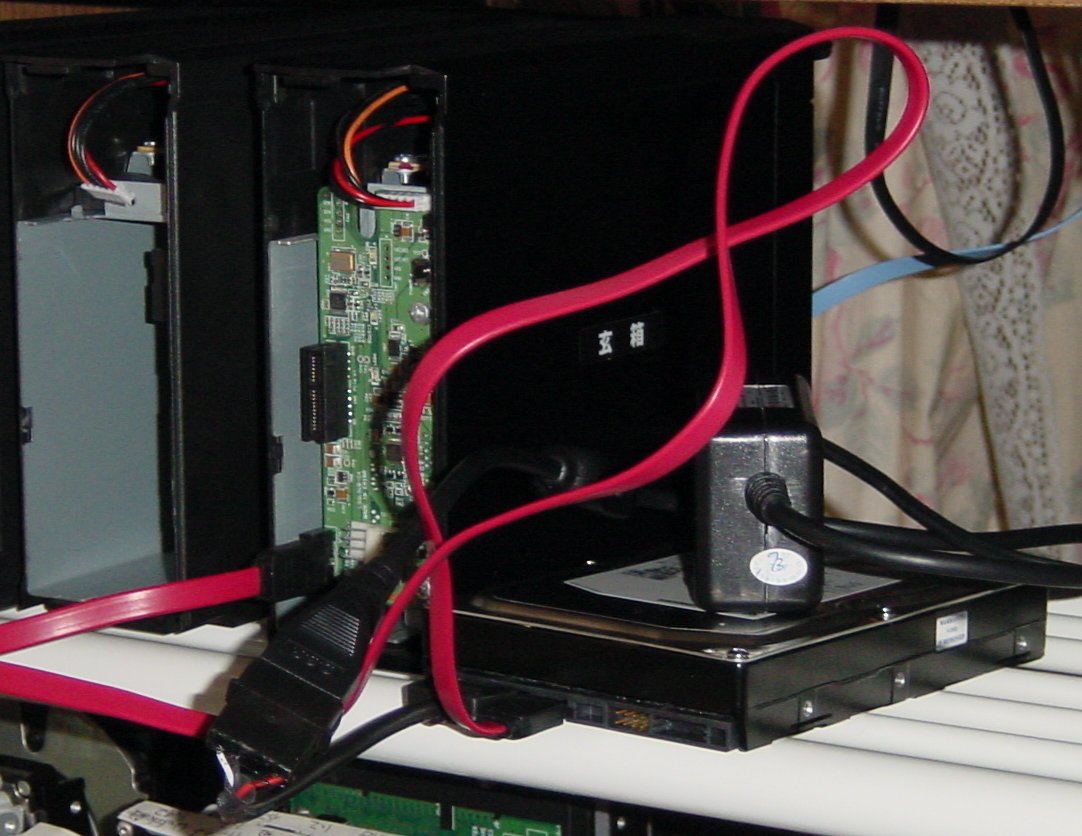
<p>
<a href="http://www.yamasita.jp/linkstation/2008/01/080124_1l.jpg" target="_blank">
<img src="http://www.yamasita.jp/linkstation/2008/01/080124_1s.jpg"></a>
</ul>

<h2>玄箱/Pro にログイン、root になる</h2>
<ul>
玄箱/Pro に telnet してログイン、root になります。
<pre>
Debian GNU/Linux 4.0
kup login: yasunari
Password:
Last login: Sat Jan 19 14:15:59 2008 from uxl.yamasita.jp on pts/0
Linux kup 2.6.12.6-arm1 #27 Tue Apr 10 22:47:16 JST 2007 armv5tejl

The programs included with the Debian GNU/Linux system are free software;
the exact distribution terms for each program are described in the
individual files in /usr/share/doc/*/copyright.

Debian GNU/Linux comes with ABSOLUTELY NO WARRANTY, to the extent
permitted by applicable law.
yasunari@kup:~$ su - root
Password:
kup:~#
</pre>

</ul>

<h2>LS-HGL の HDD を認識しているか確認</h2>
<ul>
dmesg で LS-HGL の HDD を認識しているか確認します。

<pre>
kup:~# dmesg | less
	:
	:
scsi0 : Marvell SCSI to SATA adapter
scsi1 : Marvell SCSI to SATA adapter
  Vendor: Seagate   Model: ST3120026AS       Rev: 3.18
  Type:   Direct-Access                      ANSI SCSI revision: 03
  Vendor: SAMSUNG   Model: HD321KJ           Rev: CP10
  Type:   Direct-Access                      ANSI SCSI revision: 03
SCSI device sda: 234441648 512-byte hdwr sectors (120034 MB)
SCSI device sda: drive cache: write back
SCSI device sda: 234441648 512-byte hdwr sectors (120034 MB)
SCSI device sda: drive cache: write back
 sda: sda1 sda2 sda3 sda4
Attached scsi disk sda at scsi0, channel 0, id 0, lun 0
SCSI device sdb: 625142448 512-byte hdwr sectors (320073 MB)
SCSI device sdb: drive cache: write back
SCSI device sdb: 625142448 512-byte hdwr sectors (320073 MB)
SCSI device sdb: drive cache: write back
 sdb: sdb1 sdb2 sdb4 < sdb5 sdb6 >
Attached scsi disk sdb at scsi1, channel 0, id 0, lun 0
Attached scsi generic sg0 at scsi0, channel 0, id 0, lun 0,  type 0
Attached scsi generic sg1 at scsi1, channel 0, id 0, lun 0,  type 0
	:
	:
</pre>
この例では、sdb と認識しています。
</ul>
<h2>LS-HGL の HDD のマウント</h2>
<ul>
マウントポイントとして/tmp/root を作成し、<br>
/ パーティション(/dev/sdb2)をマウントします。
<pre>
kup:~# mkdir /tmp/root
kup:~# mount /dev/sdb2 /tmp/root
kup:~# ls /tmp/root
bin  boot  dev  etc  home  lib  lost+found  mnt  proc  root  sbin  share  sys  tmp  usr  var  www
kup:~#
</pre>
</ul>
<h2>telnetd が起動するようにする</h2>
<ul>
<h3>telnetd の確認</h3>
<ul>
まずは、telnetd があるか確認します。
<pre>
kup:~# cd /tmp/root
kup:/tmp/root# ls -l usr/sbin/telnetd
lrwxrwxrwx 1 root root 17 Nov  6 16:07 usr/sbin/telnetd -> ../../bin/busybox
kup:/tmp/root#
</pre>
このように、usr/sbin/telnetd が ../../bin/busybox に
シンボリックリンクされていれば OK です。
</ul>

<h3>etc/init.d/rcS のバックアップ</h3>
<ul>
念のためバックアップしておきます。<br>
mv でリネームしてからコピーしているのは、
オリジナルのタイムスタンプやオーナ、モードを保存するためです。
<pre>
kup:/tmp/root# cd etc/init.d/
kup:/tmp/root/etc/init.d# mv rcS rcS.orig
kup:/tmp/root/etc/init.d# cp rcS.orig rcS
kup:/tmp/root/etc/init.d# ls -l rcS*
-rwxr-xr-x 1 root root 977 Jan 19 14:43 rcS
-rwxr-xr-x 1 root root 977 Oct 11 21:32 rcS.orig
kup:/tmp/root/etc/init.d#
</pre>
ls -l で見て、パーミッション(-rwxr-xr-x)、
オーナ（root）、グループ（root）が同じであれば、OK です。
</ul>
<h3>etc/init.d/rcS の編集</h3>
<ul>
etc/init.d/rcS を vi で編集し、末尾に telnetd 起動ステップを追加します。
<pre>
kup:/tmp/root/etc/init.d# vi rcS
	:
	:
	:
/usr/sbin/telnetd
</pre>
</ul>
</ul>
<h2>root のパスワードをつぶす</h2>
<ul>
標準ファームの root のパスワードはわからないので、
ファイルを編集して消してしまいます。

<h3>/etc/shadow のバックアップ</h3>
<ul>
同じく念のためバックアップを取ります。
<pre>
kup:/tmp/root/etc/init.d# cd ..
kup:/tmp/root/etc# mv shadow shadow.orig
kup:/tmp/root/etc# cp shadow.orig shadow
kup:/tmp/root/etc# ls -l shadow*
-r-------- 1 root root 370 Jan 19 14:51 shadow
-r-------- 1 root root 370 Oct 11 21:32 shadow.orig
kup:/tmp/root/etc#
</pre>
</ul>
<h3>暗号化されたバスワードを消す</h3>
<ul>
<pre>
kup:/tmp/root/etc# vi shadow
	:
	:
root:（暗号化されたパスワード）:11009:0:99999:7:::
</pre>
この暗号化されたパスワードを消し、
<pre>
root::11009:0:99999:7:::
</pre>
と変更します。
<p>
このファイルは read only のファイルなので、<br>
vi で :wq としても
<pre>
E45: 'readonly' option is set (add ! to override)
</pre>
と怒られ、保存できません。<br>
<pre>
:w!
:q
</pre>
として、保存、終了します。
</ul>
</ul>
<h2>LS-HGL の HDD のアンマウント</h2>
<ul>
シャットダウンするので、アンマウント不要といえば不要ですが、
作法として（？）アンマウントしておきます。
<p>
カレントディレクトリが /tmp/root 以下、
つまりマウントした LS-HGL の HDD の中であれば
アンマウントできないので、
外（ここでは /）に出てからアンマウントします。
<pre>
kup:/tmp/root/etc# cd /
kup:/# umount /tmp/root
kup:/#
</pre>
</ul>
<h2>玄箱/Pro からログアウト</h2>

<h2>玄箱/Pro をシャットダウン</h2>
<ul>
電源ボタン長押しでシャットダウンします。
</ul>

<h2>LS-HGL の HDD を LS-HGL に戻す</h2>
<ul>
逆の手順で、HDD を戻します。
</ul>

<h2>LS-HGL の電源 ON</h2>
<ul>
</ul>

<h2>LS-HGL に telnet</h2>
<ul>
<pre>

BUFFALO INC. LinkStation series LS-HGL(SUININ)
LS-HGL487 login: root
root@LS-HGL487:~#
</pre>
</ul>
]]>
        
    </content>
</entry>

<entry>
    <title>インストール</title>
    <link rel="alternate" type="text/html" href="http://www.yamasita.jp/linkstation/ls-hgl/hackkit/post_3.html" />
    <id>tag:www.yamasita.jp,2008:/linkstation/ls-hgl/hackkit//10.775</id>

    <published>2008-03-23T12:00:00Z</published>
    <updated>2008-08-16T08:25:42Z</updated>

    <summary>LinkStation LS-HGL シリーズへハックキットをインストールする方...</summary>
    <author>
        <name></name>
        
    </author>
    
    
    <content type="html" xml:lang="ja" xml:base="http://www.yamasita.jp/linkstation/ls-hgl/hackkit/">
        <![CDATA[LinkStation LS-HGL シリーズへハックキットをインストールする方法

<h2>LS-HGL ハックキットのファイルの転送</h2>
<ul>
LS-HGL ハックキットの CD-R に納めている<br>
・LS-HGL_hackkit_<i>Ver.</i>.sh<br>
・LS-HGL_hackkit_<i>Ver.</i>.tar.gz<br>
を LS-HGL の
/mnt/disk1/share/debian に転送します。<br>
転送には ftp かファイル共有を使用します。
<p>
注：<i>Ver.</i> は LS-HGL ハックキットのバージョンです。
</ul>

<h2>ログイン</h2>
<ul>
LS-HGL にログインし、root になります。
</ul>

<h2>時計を合わせる</h2>
<ul>
ここで、時計を合わせます。
<pre>
root@LS-HGL487:~# date
Thu Nov  1 00:02:45 JST 2007
root@LS-HGL487:~# date 081317252008
Wed Aug 13 17:25:00 JST 2008
root@LS-HGL487:~#
</pre>
これは、08 月 13 日 17 時 25 分 2008 年にあわせた例です。
</ul>

<h2>カスタマイズ</h2>
<ul>
LS-HGL_hackkit_<i>Ver.</i>.sh の最初の方に
<pre>
ADDRESS=192.168.2.44
NETWORK=192.168.2.0
NETMASK=255.255.255.0
BROADCAST=192.168.2.255
GATEWAY=192.168.2.1
NAMESERVER=192.168.1.2
HOSTNAME=hackkit
</pre>
という部分があります。この部分を環境に合わせます
<table border>
<tr><td>変数</td><td>内容</td><td>デフォルト値</td></tr>
<tr><td>ADDRESS</td>
<td>LS-HGL の IP アドレス</td>
<td>192.168.2.44</td></tr>

<tr><td>NETWORK</td>
<td>LS-HGL を接続するネットワークアドレス</td>
<td>192.168.2.0</td></tr>

<tr><td>NETMASK</td>
<td>LS-HGL を接続するネットワークのネットマスク</td>
<td>255.255.255.0</td></tr>

<tr><td>BROADCAST</td>
<td>LS-HGL を接続するネットワークのブロードキャストアドレス</td>
<td>192.168.2.255</td></tr>

<tr><td>GATEWAY</td>
<td>デフォルトゲートウェイ</td>
<td>192.168.2.1</td></tr>

<tr><td>NAMESERVER</td>
<td>ネームサーバの IP アドレス</td>
<td>192.168.1.2</td></tr>

<tr><td>HOSTNAME</td>
<td>LS-HGL のホスト名</td>
<td>hackkit</td></tr>
</table>
</ul>

<h2>HDD の接続</h2>
<ul>
インストールする HDD を USB で接続します。<br>
/dev/sdb として認識されます。<br>
認識されていれば、/var/log/messages に以下のようなログが残ります。

<pre>
Apr  5 14:14:41 LS-HGL487 kernel: usb 1-1: new high speed USB device using ehci_platform and address 2
Apr  5 14:14:41 LS-HGL487 kernel: usb 1-1: configuration #1 chosen from 1 choice
Apr  5 14:14:41 LS-HGL487 kernel: scsi2 : SCSI emulation for USB Mass Storage devices
Apr  5 14:14:46 LS-HGL487 kernel:   Vendor: ST325082  Model:         3ND06QAZ  Rev:
Apr  5 14:14:46 LS-HGL487 kernel:   Type:   Direct-Access                      ANSI SCSI revision: 02
Apr  5 14:14:46 LS-HGL487 kernel: SCSI device sdb: 488397168 512-byte hdwr sectors (250059 MB)
Apr  5 14:14:46 LS-HGL487 kernel: sdb: Write Protect is off
Apr  5 14:14:46 LS-HGL487 kernel: sdb: assuming drive cache: write through
Apr  5 14:14:46 LS-HGL487 kernel: SCSI device sdb: 488397168 512-byte hdwr sectors (250059 MB)
Apr  5 14:14:46 LS-HGL487 kernel: sdb: Write Protect is off
Apr  5 14:14:46 LS-HGL487 kernel: sdb: assuming drive cache: write through
Apr  5 14:14:46 LS-HGL487 kernel:  sdb: sdb1 sdb2 sdb3 sdb4
Apr  5 14:14:46 LS-HGL487 kernel: sd 2:0:0:0: Attached scsi disk sdb
Apr  5 14:14:46 LS-HGL487 kernel: sd 2:0:0:0: Attached scsi generic sg1 type 0
</pre>
接続した HDD が自動的にマウントされた場合は umount します。
<pre>
root@LS-HGL487:~# <u>df</u>
Filesystem           1k-blocks      Used Available Use% Mounted on
/dev/root.old            15351     14652       699  95% /initrd
/dev/sda2              4994004    244460   4749544   5% /
/dev/ram1                15360       104     15256   1% /mnt/ram
/dev/sda1               988212     24220    963992   2% /boot
/dev/sda6            237067816    340220 236727596   0% /mnt/disk1
/dev/usbdisk1_1         194443     11629    172775   6% /mnt/usbdisk1
root@LS-HGL487:~# <u>umount /mnt/usbdisk1</u>
root@LS-HGL487:~#
</pre>

</ul>

<h2>パーティションの設定</h2>
<ul>
パーティションを切ります。
<table  border>
<tr><td>パーティション</td>
<td>容量</td>
<td>システム</td>
<td>用途</td>
</tr>

<tr><td>/dev/sdb1</td>
<td>200MB</td>
<td>Linux</td>
<td>/boot</td>
</tr>

<tr><td>/dev/sdb2</td>
<td>2GB</td>
<td>Linux</td>
<td>/</td>
</tr>

<tr><td>/dev/sdb3</td>
<td>256MB</td>
<td>Linux swap</td>
<td>swap</td>
</tr>

<tr><td>/dev/sdb4</td>
<td>残り全部</td>
<td>Linux</td>
<td>データ</td>
</tr>
</table>
<p>
実行例：
<pre>
root@LS-HGL487:~# <u>fdisk /dev/sdb</u>

The number of cylinders for this disk is set to 19457.
There is nothing wrong with that, but this is larger than 1024,
and could in certain setups cause problems with:
1) software that runs at boot time (e.g., old versions of LILO)
2) booting and partitioning software from other OSs
   (e.g., DOS FDISK, OS/2 FDISK)

Command (m for help): <u>p</u>

Disk /dev/sdb: 160.0 GB, 160041885696 bytes
255 heads, 63 sectors/track, 19457 cylinders
Units = cylinders of 16065 * 512 = 8225280 bytes

   Device Boot      Start         End      Blocks   Id  System
/dev/sdb1               1          25      200781   83  Linux
/dev/sdb2              26          87      498015   83  Linux
/dev/sdb4              88       19457   155589525    5  Extended
/dev/sdb5              88         104      136521   82  Linux swap
/dev/sdb6             105       19457   155452941   83  Linux

Command (m for help): 
</pre>
もし上記のようにパーティションがあれば、
パーティションを消します
<pre>
Command (m for help): <u>d</u>
Partition number (1-6): <u>6</u>

Command (m for help): <u>d</u>
Partition number (1-5): <u>5</u>

Command (m for help): <u>d</u>
Partition number (1-5): <u>4</u>

Command (m for help): <u>d</u>
Partition number (1-6): <u>2</u>

Command (m for help): <u>d</u>
Selected partition 1

Command (m for help): <u>p</u>

Disk /dev/sdb: 160.0 GB, 160041885696 bytes
255 heads, 63 sectors/track, 19457 cylinders
Units = cylinders of 16065 * 512 = 8225280 bytes

   Device Boot      Start         End      Blocks   Id  System

Command (m for help):
</pre>
パーティションを切ります
<pre>
Command (m for help): <u>n</u>
Command action
   e   extended
   p   primary partition (1-4)
<u>p</u>
Partition number (1-4): <u>1</u>
First cylinder (1-19457, default 1): <u>[Enter]</u>
Using default value 1
Last cylinder or +size or +sizeM or +sizeK (1-19457, default 19457): +<u>200M</u>

Command (m for help): <u>n</u>
Command action
   e   extended
   p   primary partition (1-4)
<u>p</u>
Partition number (1-4): <u>2</u>
First cylinder (26-19457, default 26): <u>[Enter]</u>
Using default value 26
Last cylinder or +size or +sizeM or +sizeK (26-19457, default 19457): <u>+2096M</u>

Command (m for help): <u>n</u>
Command action
   e   extended
   p   primary partition (1-4)
p
Partition number (1-4): <u>3</u>
First cylinder (282-19457, default 282): <u>[Enter]</u>
Using default value 282
Last cylinder or +size or +sizeM or +sizeK (282-19457, default 19457): <u>+256M</u>

Command (m for help): <u>n</u>
Command action
   e   extended
   p   primary partition (1-4)
<u>p</u>
Selected partition 4
First cylinder (314-19457, default 314): <u>[Enter]</u>
Using default value 314
Last cylinder or +size or +sizeM or +sizeK (314-19457, default 19457): <u>[Enter]</u>
Using default value 19457

Command (m for help): <u>t</u>
Partition number (1-4): <u>3</u>
Hex code (type L to list codes): <u>82</u>
Changed system type of partition 3 to 82 (Linux swap)

Command (m for help): <u>p</u>

Disk /dev/sdb: 160.0 GB, 160041885696 bytes
255 heads, 63 sectors/track, 19457 cylinders
Units = cylinders of 16065 * 512 = 8225280 bytes

   Device Boot      Start         End      Blocks   Id  System
/dev/sdb1               1          25      200781   83  Linux
/dev/sdb2              26         281     2056320   83  Linux
/dev/sdb3             282         313      257040   82  Linux swap
/dev/sdb4             314       19457   153774180   83  Linux

Command (m for help): <u>w</u>
The partition table has been altered!

Calling ioctl() to re-read partition table.

WARNING: Re-reading the partition table failed with error 16: Device or resource busy.
The kernel still uses the old table.
The new table will be used at the next reboot.
Syncing disks.
root@LS-HGL487:~#
</pre>
</ul>

<h2>インストール</h2>
<ul>
スクリプトを実行します。
<pre>
root@LS-HGL487:/mnt/disk1/share/debian# <u>sh LS-HGL_hackkit_<i>Ver.</i>.sh</u>
formating hard drive    ..
mke2fs 1.27 (8-Mar-2002)
Filesystem label=
OS type: Linux
Block size=1024 (log=0)
Fragment size=1024 (log=0)
50200 inodes, 200781 blocks
10039 blocks (5.00%) reserved for the super user
First data block=1
25 block groups
8192 blocks per group, 8192 fragments per group
2008 inodes per group
Superblock backups stored on blocks:
        8193, 24577, 40961, 57345, 73729

Writing inode tables: done
Creating journal (4096 blocks): done
Writing superblocks and filesystem accounting information: done

This filesystem will be automatically checked every 33 mounts or
180 days, whichever comes first.  Use tune2fs -c or -i to override.
	:
	:
creating network_interfaces ...
creating resolv.conf ...
creating hosts ...
creating hostname ...
root@LS-HGL487:/mnt/disk1/share/debian#
</pre>

</ul>

<h2>インストール終了</h2>
<ul>
以上の手順で、ハックキットのインストールは完了です。
<p>
電源スイッチを OFF にして LS-HGL をシャットダウンします。
</ul>
]]>
        
    </content>
</entry>

<entry>
    <title>最初の設定</title>
    <link rel="alternate" type="text/html" href="http://www.yamasita.jp/linkstation/ls-hgl/hackkit/post_4.html" />
    <id>tag:www.yamasita.jp,2008:/linkstation/ls-hgl/hackkit//10.776</id>

    <published>2008-03-24T03:00:00Z</published>
    <updated>2008-10-30T13:21:52Z</updated>

    <summary>debian 起動 LS-HGL をコンセントから抜き、 SATA で接続してい...</summary>
    <author>
        <name></name>
        
    </author>
    
    
    <content type="html" xml:lang="ja" xml:base="http://www.yamasita.jp/linkstation/ls-hgl/hackkit/">
        <![CDATA[<h2>debian 起動</h2>
<ul>
LS-HGL をコンセントから抜き、<br>
SATA で接続していた標準ファームの HDD を取り外し、<br>
USB 経由で接続していた実験用 HDD を LS-HGL に SATA で接続します。
<p>
コンセントを刺して、電源 ON で debian が起動してきます。
<p>
※LS-HGL はコンセントが刺さっていると、電源が OFF であっても内部は動作しています。<br>
　HDD を交換する際には必ずコンセントから電源ケーブルを抜いて作業をします。
</ul>

<h2>ログイン</h2>
<ul>
telnet もしくはシリアルコンソールから guest でログインします。
guest のパスワードは hack です。
<pre>
Debian GNU/Linux 4.0 hackkit ttyS0

hackkit login: <u>guest</u>
Password: <u>hack</u>（画面には表示されません）
Linux hackkit 2.6.16.16-arm1 #304 Thu Feb 21 11:41:19 JST 2008 armv5tejl

The programs included with the Debian GNU/Linux system are free software;
the exact distribution terms for each program are described in the
individual files in /usr/share/doc/*/copyright.

Debian GNU/Linux comes with ABSOLUTELY NO WARRANTY, to the extent
permitted by applicable law.
No directory, logging in with HOME=/
guest@hackkit:/$
</pre>
</ul>

<h2>root になる</h2>
<ul>
<pre>
guest@hackkit:/$ <u>su - root</u>
Password: <u>hack</u>（画面には表示されません）
hackkit:~#
</pre>
root のパスワードも hack です。
</ul>

<h2>時計を合わせる</h2>
<ul>
LS-HGL の内部時計は、バッテリバックアップされていないので、
手動で時計を合わせます。
<pre>
hackkit:~# date
Thu Nov  1 01:11:35 JST 2007
hackkit:~# date 081518362008
Fri Aug 15 18:36:00 JST 2008
hackkit:~#
</pre>
この例では 08 月 15 日 18 時 36 分 2008 年　に合わせている。<br>
当然、合わせた時刻を指定すること。
</ul>

<h2>root のパスワード変更</h2>
<ul>
<pre>
hackkit:~# passwd root
Enter new UNIX password: <u>（新しいパスワード）</u>
Retype new UNIX password: <u>（もう一度新しいパスワード）</u>
passwd: password updated successfully
hackkit:~#
</pre>
変更後は、もう１つログインし、
<pre>
guest@hackkit:/$ <u>su - root</u>
Password: <u>（新しいパスワード）</u>
hackkit:~#
</pre>
で root になれることを確認しておくと良いでしょう。
</ul>

<h2>一般ユーザの作成</h2>
<ul>
guest は危ないので、別の（あなたの）ユーザを作成しておきます。
<h3>グループの作成</h3>
<ul>
<pre>
hackkit:~# <u>addgroup yamasita</u>
Adding group `yamasita' (1000)...
Done.
</pre>

</ul>
<h3>ホームディレクトリの作成</h3>
<ul>
<pre>
hackkit:~# <u>mkdir /home/yamasita</u>
hackkit:~#
</pre>
</ul>

<h3>ユーザの作成</h3>
<ul>
<pre>
hackkit:~# <u>adduser --home /home/yamasita/yasunari --ingroup yamasita yasunari</u>
Adding user `yasunari'...
Adding new user `yasunari' (1001) with group `yamasita'.
Creating home directory `/home/yamasita/yasunari'.
Copying files from `/etc/skel'
Enter new UNIX password: <u>（パスワード）</u>
Retype new UNIX password: <u>（もう一度パスワード）</u>
passwd: password updated successfully
Changing the user information for yasunari
Enter the new value, or press ENTER for the default
        Full Name []: <u>Yasunari Yamashita</u>
        Room Number []: <u>[Enter]</u>
        Work Phone []: <u>[Enter]</u>
        Home Phone []: <u>[Enter]</u>
        Other []:
Is the information correct? [y/N] <u>y</u>
hackkit:~#
</pre>
</ul>
</ul>

<h2>guest の削除</h2>
<ul>

再度ログインし直して、guest を消します
<pre>
Debian GNU/Linux 4.0 hackkit ttyS0
hackkit login: <u>yasunari</u>
Password: <u>（パスワード）</u>
Linux hackkit 2.6.16.16-arm1 #304 Thu Feb 21 11:41:19 JST 2008 armv5tejl

The programs included with the Debian GNU/Linux system are free software;
the exact distribution terms for each program are described in the
individual files in /usr/share/doc/*/copyright.

Debian GNU/Linux comes with ABSOLUTELY NO WARRANTY, to the extent
permitted by applicable law.
yasunari@hackkit:~$ <u>su - root</u>
Password: <u>パスワード</u>
hackkit:~# <u>deluser guest</u>
Removing user `guest'...
done.
hackkit:~# 
</pre>

</ul>
こんなところかな？
]]>
        
    </content>
</entry>

<entry>
    <title>パッケージのアップデート</title>
    <link rel="alternate" type="text/html" href="http://www.yamasita.jp/linkstation/ls-hgl/hackkit/post_5.html" />
    <id>tag:www.yamasita.jp,2008:/linkstation/ls-hgl/hackkit//10.777</id>

    <published>2008-03-25T03:00:00Z</published>
    <updated>2008-03-22T23:11:31Z</updated>

    <summary>apt を使って debian のパッケージを最新にアップデートします。 実行す...</summary>
    <author>
        <name></name>
        
    </author>
    
    
    <content type="html" xml:lang="ja" xml:base="http://www.yamasita.jp/linkstation/ls-hgl/hackkit/">
        <![CDATA[apt を使って debian のパッケージを最新にアップデートします。<br>
実行する時期によって、下記以外にもアップデートされる場合があります。
<p>
インストール直後だけではなく、時々実行すると良いでしょう。

<h2>パッケージリストのアップデート</h2>
<ul>
まずはパッケージリストをアップデートします。
<pre>
hackkit:~# apt-get update
Get:1 http://ftp2.jp.debian.org etch Release.gpg [378B]
Get:2 http://ftp2.jp.debian.org proposed-updates Release.gpg [189B]
Get:3 http://ftp2.jp.debian.org etch/updates Release.gpg [189B]
	:
	:
	:
Hit http://security.debian.org etch/updates/non-free Sources
Fetched 511kB in 4s (119kB/s)
Reading package lists... Done
hackkit:~# 
</pre>
</ul>

<h2>パッケージのアップデート</h2>
<ul>
続いて更新されたパッケージをアップデートします。
<pre>
hackkit:~# apt-get upgrade
Reading package lists... Done
Building dependency tree... Done
0 upgraded, 0 newly installed, 0 to remove and 0 not upgraded.
hackkit:~# 
</pre>
この例では更新されたパッケージはありませんでした。
</ul>

<h2>掃除</h2>
<ul>
最後に、
取得、インストールしたパッケージファイルを掃除しておきます。
<pre>
hackkit:~# apt-get clean
hackkit:~#
</pre>
</ul>
]]>
        
    </content>
</entry>

<entry>
    <title>時刻同期</title>
    <link rel="alternate" type="text/html" href="http://www.yamasita.jp/linkstation/ls-hgl/hackkit/post_6.html" />
    <id>tag:www.yamasita.jp,2008:/linkstation/ls-hgl/hackkit//10.823</id>

    <published>2008-03-26T10:00:00Z</published>
    <updated>2008-04-16T05:11:10Z</updated>

    <summary>ntpd を動作させて時刻を同期します。 ntpd のインストール apt-ge...</summary>
    <author>
        <name></name>
        
    </author>
    
    
    <content type="html" xml:lang="ja" xml:base="http://www.yamasita.jp/linkstation/ls-hgl/hackkit/">
        <![CDATA[ntpd を動作させて時刻を同期します。

<h2>ntpd のインストール</h2>
<ul>
apt-get を使用して ntpd をインストールします。
<pre>
hackkit:~# apt-get install ntp
Reading package lists... Done
Building dependency tree... Done
The following extra packages will be installed:
  perl perl-modules
Suggested packages:
  ntp-doc libterm-readline-gnu-perl libterm-readline-perl-perl
Recommended packages:
  perl-doc
The following NEW packages will be installed:
  ntp perl perl-modules
0 upgraded, 3 newly installed, 0 to remove and 0 not upgraded.
Need to get 6064kB of archives.
After unpacking 24.9MB of additional disk space will be used.
Do you want to continue [Y/n]? y
Get:1 http://ftp2.jp.debian.org etch/main perl-modules 5.8.8-7 [2310kB]
Get:2 http://ftp2.jp.debian.org etch/main perl 5.8.8-7 [3413kB]
Get:3 http://ftp2.jp.debian.org etch/main ntp 1:4.2.2.p4+dfsg-2 [342kB]
Fetched 6064kB in 7s (798kB/s)
Selecting previously deselected package perl-modules.
(Reading database ... 8810 files and directories currently installed.)
Unpacking perl-modules (from .../perl-modules_5.8.8-7_all.deb) ...
Selecting previously deselected package perl.
Unpacking perl (from .../archives/perl_5.8.8-7_arm.deb) ...
Selecting previously deselected package ntp.
Unpacking ntp (from .../ntp_1%3a4.2.2.p4+dfsg-2_arm.deb) ...
Setting up perl-modules (5.8.8-7) ...
Setting up perl (5.8.8-7) ...
Starting NTP server: ntpd.
hackkit:~#
</pre>
</ul>

<h2>ntp.conf の修正</h2>
<ul>
国内のサーバと同期するよう修正します。<br>
お使いの ISP が提供している NTP サーバを指定すると良いでしょう。
<pre>
hackkit:~# cd /etc
hackkit:/etc# mv ntp.conf ntp.conf.orig
hackkit:/etc# cp ntp.conf.orig ntp.conf
hackkit:/etc# ls -l ntp.conf*
-rw-r--r-- 1 root root 1582 Jul  6 23:44 ntp.conf
-rw-r--r-- 1 root root 1582 Mar  4 22:58 ntp.conf.orig
hackkit:/etc# vi ntp.conf
	:
	:
hackkit:/etc# diff -c ntp.conf.orig ntp.conf
*** ntp.conf.orig       Sun Mar  4 22:58:52 2007
--- ntp.conf    Fri Jul  6 23:46:38 2007
***************
*** 11,25 ****

  # You do need to talk to an NTP server or two (or three).
  #server ntp.your-provider.example

  # pool.ntp.org maps to more than 300 low-stratum NTP servers.
  # Your server will pick a different set every time it starts up.
  #  *** Please consider joining the pool! ***
  #  *** <http://www.pool.ntp.org/join.html> ***
! server 0.debian.pool.ntp.org iburst
! server 1.debian.pool.ntp.org iburst
! server 2.debian.pool.ntp.org iburst
! server 3.debian.pool.ntp.org iburst

  # By default, exchange time with everybody, but don't allow configuration.
  # See /usr/share/doc/ntp-doc/html/accopt.html for details.
--- 11,29 ----

  # You do need to talk to an NTP server or two (or three).
  #server ntp.your-provider.example
+ server  ntp3.jst.mfeed.ad.jp
+ server  ntp2.jst.mfeed.ad.jp
+ server  ntp1.jst.mfeed.ad.jp
+ server  link.yamasita.jp

  # pool.ntp.org maps to more than 300 low-stratum NTP servers.
  # Your server will pick a different set every time it starts up.
  #  *** Please consider joining the pool! ***
  #  *** <http://www.pool.ntp.org/join.html> ***
! #server 0.debian.pool.ntp.org iburst
! #server 1.debian.pool.ntp.org iburst
! #server 2.debian.pool.ntp.org iburst
! #server 3.debian.pool.ntp.org iburst

  # By default, exchange time with everybody, but don't allow configuration.
  # See /usr/share/doc/ntp-doc/html/accopt.html for details.
hackkit:/etc#
</pre>
</ul>

<h2>ntpd の再起動</h2>
<ul>
ntpd に設定を読込ませるため、ntpd を再起動します。
<pre>
hackkit:/etc# /etc/init.d/ntp restart
Stopping NTP server: ntpd.
Starting NTP server: ntpd.
hackkit:/etc# ntpq -p
     remote           refid      st t when poll reach   delay   offset  jitter
==============================================================================
 ntp3.jst.mfeed. 210.173.160.56   2 u    1   64    1   11.589   -7.476   0.015
 ntp2.jst.mfeed. .INIT.          16 u    -   64    0    0.000    0.000   0.015
 ntp1.jst.mfeed. .INIT.          16 u    -   64    0    0.000    0.000   0.015
 link.yamasita.j .INIT.          16 u    -   64    0    0.000    0.000   0.015
hackkit:/etc#
</pre>
しばらくすると、同期します。
<pre>
hackkit:/etc# ntpq -p
     remote           refid      st t when poll reach   delay   offset  jitter
==============================================================================
*ntp3.jst.mfeed. 210.173.160.56   2 u   57   64  377   11.410   94.391  97.586
+ntp2.jst.mfeed. 210.173.160.56   2 u   50   64  377   11.154   -7.658 130.848
+ntp1.jst.mfeed. 210.173.160.86   2 u   48   64  377   11.339   -7.612 130.780
xlink.yamasita.j 210.173.160.27   3 u   48   64  377    0.374  221.923 174.693
hackkit:/etc#
</pre>
</ul>
]]>
        
    </content>
</entry>

<entry>
    <title>Windows 向けファイルサーバ</title>
    <link rel="alternate" type="text/html" href="http://www.yamasita.jp/linkstation/ls-hgl/hackkit/windows.html" />
    <id>tag:www.yamasita.jp,2008:/linkstation/ls-hgl/hackkit//10.978</id>

    <published>2008-08-21T10:00:00Z</published>
    <updated>2008-08-17T08:15:04Z</updated>

    <summary>samba をインストールして、Windows のファイルサーバにします。 sa...</summary>
    <author>
        <name></name>
        
    </author>
    
    
    <content type="html" xml:lang="ja" xml:base="http://www.yamasita.jp/linkstation/ls-hgl/hackkit/">
        <![CDATA[samba をインストールして、Windows のファイルサーバにします。
<h2>samba のインストール</h2>
<ul>
<pre>
hackkit:~# apt-get install samba
Reading package lists... Done
Building dependency tree... Done
The following extra packages will be installed:
  libcupsys2 libkrb53 samba-common
Suggested packages:
  cupsys-common krb5-doc krb5-user
Recommended packages:
  smbldap-tools
The following NEW packages will be installed:
  libcupsys2 libkrb53 samba samba-common
0 upgraded, 4 newly installed, 0 to remove and 0 not upgraded.
Need to get 6207kB of archives.
After unpacking 14.4MB of additional disk space will be used.
Do you want to continue [Y/n]? y
Get:1 http://ftp2.jp.debian.org etch/main libkrb53 1.4.4-7etch6 [390kB]
Get:2 http://ftp2.jp.debian.org proposed-updates/main libcupsys2 1.2.7-4etch4 [155kB]
Get:3 http://ftp2.jp.debian.org etch/main samba-common 3.0.24-6etch10 [2379kB]
	:
	:
Package configuration


 lqqqqqqqqqqqqqqqqqqqqu Samba Server tqqqqqqqqqqqqqqqqqqqqqk
 x Please specify the workgroup you want this server to    x
 x appear to be in when queried by clients. Note that      x
 x this parameter also controls the domain name used with  x
 x the security=domain setting.                            x
 x                                                         x
 x Workgroup/Domain Name:                                  x
 x                                                         x
 x YAMASITA_______________________________________________ x
 x                                                         x
 x                         <Ok>                            x
 x                                                         x
 mqqqqqqqqqqqqqqqqqqqqqqqqqqqqqqqqqqqqqqqqqqqqqqqqqqqqqqqqqj

Package configuration

 lqqqqqqqqqqqqqqqqqqqqu Samba Server tqqqqqqqqqqqqqqqqqqqqqk
 x                                                         x
 x All recent Windows clients communicate with SMB         x
 x servers using encrypted passwords. If you want to use   x
 x clear text passwords you will need to change a          x
 x parameter in your Windows registry.                     x
 x                                                         x
 x Enabling this option is highly recommended. If you do,  x
 x make sure you have a valid /etc/samba/smbpasswd file    x
 x and that you set passwords in there for each user       x
 x using the smbpasswd command.                            x
 x                                                         x
 x Use password encryption?                                x
 x                                                         x
 x              <Yes>                 <No>                 x
 x                                                         x
 mqqqqqqqqqqqqqqqqqqqqqqqqqqqqqqqqqqqqqqqqqqqqqqqqqqqqqqqqqj

Package configuration

 lqqqqqqqqqqqqqqqqqqqqu Samba Server tqqqqqqqqqqqqqqqqqqqqqk
 x                                                         x
 x If your computer gets IP address information from a     x
 x DHCP server on the network, the DHCP server may also    x
 x provide information about WINS servers ("NetBIOS name   x
 x servers") present on the network.  This requires a      x
 x change to your smb.conf file so that DHCP-provided      x
 x WINS settings will automatically be read from           x
 x /etc/samba/dhcp.conf.                                   x
 x                                                         x
 x The dhcp3-client package must be installed to take      x
 x advantage of this feature.                              x
 x                                                         x
 x                         <Ok>                            x
 x                                                         x
 mqqqqqqqqqqqqqqqqqqqqqqqqqqqqqqqqqqqqqqqqqqqqqqqqqqqqqqqqqj

Package configuration


     lqqqqqqqqqqqqqqqqqu Samba Server tqqqqqqqqqqqqqqqqqk
     x                                                  x
     x Modify smb.conf to use WINS settings from DHCP?  x
     x                                                  x
     x            <Yes>               <No>              x
     x                                                  x
     mqqqqqqqqqqqqqqqqqqqqqqqqqqqqqqqqqqqqqqqqqqqqqqqqqqj

Package configuration


  lqqqqqqqqqqqqqqqqqqqu Samba Server tqqqqqqqqqqqqqqqqqqqqk
  x The Samba daemon smbd can run as a normal daemon or   x
  x from inetd. Running as a daemon is the recommended    x
  x approach.                                             x
  x                                                       x
  x How do you want to run Samba?                         x
  x                                                       x
  x                        daemons                        x
  x                        inetd                          x
  x                                                       x
  x                                                       x
  x                        <Ok>                           x
  x                                                       x
  mqqqqqqqqqqqqqqqqqqqqqqqqqqqqqqqqqqqqqqqqqqqqqqqqqqqqqqqj

Package configuration

 lqqqqqqqqqqqqqqqqqqqqu Samba Server tqqqqqqqqqqqqqqqqqqqqqk
 x                                                         x
 x To be compatible with the defaults in most versions of
 x Windows, Samba must be configured to use encrypted
 x passwords.  This requires user passwords to be stored   a
 x in a file separate from /etc/passwd.  This file can be  a
 x created automatically, but the passwords must be added  a
 x manually by running smbpasswd and be kept up-to-date    a
 x in the future.                                          a
 x                                                         a
 x If you do not create it, you will have to reconfigure   a
 x Samba (and probably your client machines) to use        a
 x plaintext passwords.
 x
 x                         <Ok>
 x                                                         x
 mqqqqqqqqqqqqqqqqqqqqqqqqqqqqqqqqqqqqqqqqqqqqqqqqqqqqqqqqqj

Package configuration


            lqqqqqqqqqu Samba Server tqqqqqqqqqqk
            x                                   x
            x Create samba password database,   x
            x /var/lib/samba/passdb.tdb?        x
            x                                   x
            x       <Yes>          <No>         x
            x                                   x
            mqqqqqqqqqqqqqqqqqqqqqqqqqqqqqqqqqqqj


Selecting previously deselected package libkrb53.
(Reading database ... 11754 files and directories currently installed.)
Unpacking libkrb53 (from .../libkrb53_1.4.4-7etch6_arm.deb) ...
Selecting previously deselected package libcupsys2.
Unpacking libcupsys2 (from .../libcupsys2_1.2.7-4etch4_arm.deb) ...
Selecting previously deselected package samba-common.
Unpacking samba-common (from .../samba-common_3.0.24-6etch10_arm.deb) ...
Selecting previously deselected package samba.
Unpacking samba (from .../samba_3.0.24-6etch10_arm.deb) ...
Setting up libkrb53 (1.4.4-7etch6) ...

Setting up libcupsys2 (1.2.7-4etch4) ...

Setting up samba-common (3.0.24-6etch10) ...

Setting up samba (3.0.24-6etch10) ...
Generating /etc/default/samba...
tdbsam_open: Converting version 0 database to version 3.
account_policy_get: tdb_fetch_uint32 failed for field 1 (min password length), returning 0
account_policy_get: tdb_fetch_uint32 failed for field 2 (password history), returning 0
account_policy_get: tdb_fetch_uint32 failed for field 3 (user must logon to change password), returning 0
account_policy_get: tdb_fetch_uint32 failed for field 4 (maximum password age), returning 0
account_policy_get: tdb_fetch_uint32 failed for field 5 (minimum password age), returning 0
account_policy_get: tdb_fetch_uint32 failed for field 6 (lockout duration), returning 0
account_policy_get: tdb_fetch_uint32 failed for field 7 (reset count minutes), returning 0
account_policy_get: tdb_fetch_uint32 failed for field 8 (bad lockout attempt), returning 0
account_policy_get: tdb_fetch_uint32 failed for field 9 (disconnect time), returning 0
account_policy_get: tdb_fetch_uint32 failed for field 10 (refuse machine password change), returning 0
Importing accout for root...ok
Importing accout for daemon...ok
Importing accout for bin...ok
Importing accout for sys...ok
Importing accout for sync...ok
Importing accout for games...ok
Importing accout for man...ok
Importing accout for lp...ok
Importing accout for mail...ok
Importing accout for news...ok
Importing accout for uucp...ok
Importing accout for proxy...ok
Importing accout for www-data...ok
Importing accout for backup...ok
Importing accout for list...ok
Importing accout for irc...ok
Importing accout for gnats...ok
Importing accout for nobody...ok
Importing accout for Debian-exim...ok
Importing accout for telnetd...ok
Importing accout for yasunari...ok
Importing accout for ntp...ok
Starting Samba daemons: nmbd smbd.

hackkit:~#
</pre>
WORKGROUP はお使いのワークグループ名を、それ以外はデフォルトを指定します。 
</ul>

<h2>smb.conf の修正</h2>
<ul>
/etc/samba/smb.conf を修正して /mnt を共有します。 
<pre>
hackkit:~# cd /etc/samba/
hackkit:/etc/samba# mv smb.conf smb.conf.orig
hackkit:/etc/samba# cp smb.conf.orig smb.conf
hackkit:/etc/samba# ls -l smb.conf*
-rw-r--r-- 1 root root 10577 Aug 16 11:21 smb.conf
-rw-r--r-- 1 root root 10577 Aug 16 11:19 smb.conf.orig
hackkit:/etc/samba# vi smb.conf
		:
		:
hackkit:/etc/samba# diff -c smb.conf.orig smb.conf
*** smb.conf.orig       Sat Aug 16 11:19:33 2008
--- smb.conf    Sat Aug 16 11:23:42 2008
***************
*** 303,305 ****
--- 303,310 ----
  ;   preexec = /bin/mount /cdrom
  ;   postexec = /bin/umount /cdrom

+ [hackkit]
+       comment = HS-DHGL share
+       path = /mnt
+       writable = Yes
+
hackkit:/etc/samba# 
</pre>
修正が終われば smb.conf を再読込みします。 
<pre>
hackkit:/etc/samba# /etc/init.d/samba reload
Reloading /etc/samba/smb.conf: smbd only.
</pre>
</ul>

<h2>ユーザの作成</h2>
<ul>
<pre>
hackkit:/etc/samba# smbpasswd -a yasunari
New SMB password:
Retype new SMB password:
hackkit:/etc/samba#
</pre>
</ul>
<h2>確認</h2>
<ul>
Windows エクスプローラから \\hackkit\hackkit がアクセスできることを確認します。 
</ul>
]]>
        
    </content>
</entry>

<entry>
    <title>Windows 向けプリンタサーバ</title>
    <link rel="alternate" type="text/html" href="http://www.yamasita.jp/linkstation/ls-hgl/hackkit/windows_1.html" />
    <id>tag:www.yamasita.jp,2008:/linkstation/ls-hgl/hackkit//10.987</id>

    <published>2008-08-23T06:00:00Z</published>
    <updated>2008-08-23T06:40:59Z</updated>

    <summary>Windows のプリンタサーバにします。 samba を使用しますので、 Wi...</summary>
    <author>
        <name></name>
        
    </author>
    
    
    <content type="html" xml:lang="ja" xml:base="http://www.yamasita.jp/linkstation/ls-hgl/hackkit/">
        <![CDATA[Windows のプリンタサーバにします。<br>
samba を使用しますので、
<a href="/linkstation/ls-hgl/hackkit/windows.html">
Windows 向けファイルサーバ</a>の手順で samba が動作していることを
前提とします。

<h2>プリンタ認識の確認</h2>
<ul>
USB プリンタを接続し、認識されるか確認します。<br>

/var/log/messages に認識されたログが残れば OK です。
<pre>
hackkit:~# tail -f /var/log/messages
	:
	:
Aug 16 11:42:59 hackkit kernel: usb 1-1: new full speed USB device using ehci_platform and address 2
Aug 16 11:42:59 hackkit kernel: usb 1-1: configuration #1 chosen from 1 choice
Aug 16 11:42:59 hackkit kernel: drivers/usb/class/usblp.c: usblp0: USB Bidirectional printer dev 2 if 0 alt 0 proto 2 vid 0x04B8 pid 0x0005
</ul>
</ul>

<h2>スプーラのインストール</h2>
<ul>
デバイスを認識したので、次はスプーラをインストールします。<br>
最近ですと cups ですが、、、、
ここでは lprng をインストールします。

<h3>lprng のインストール</h3>
<ul>
<pre>
hackkit:~# apt-get install lprng
Reading package lists... Done
Building dependency tree... Done
Suggested packages:
  magicfilter lprng-doc
The following NEW packages will be installed:
  lprng
0 upgraded, 1 newly installed, 0 to remove and 0 not upgraded.
Need to get 1891kB of archives.
After unpacking 4047kB of additional disk space will be used.
Get:1 http://ftp2.jp.debian.org etch/main lprng 3.8.28dfsg.1-1.1 [1891kB]
Fetched 1891kB in 3s (579kB/s)
Preconfiguring packages ...

Package configuration


 lqqqqqqqqqqqqqqqqqqqqqqqqqqqqqqqqqqqqqqu Configuring lprng tqqqqqqqqqqqqqqqqqqqqqqqqqqqqqqqqqqqqqqk
 x                                                                                                 x
 x Some people for various reasons do not want to start lpd. Refusing this option means lpd will   x
 x not start.  Unless you know why you want lpd not to start, just accept the default.             x
 x                                                                                                 x
 x Start lpd (Printer Daemon) at boot?                                                             x
 x                                                                                                 x
 x                            <Yes>                               <No>                             x
 x                                                                                                 x
 mqqqqqqqqqqqqqqqqqqqqqqqqqqqqqqqqqqqqqqqqqqqqqqqqqqqqqqqqqqqqqqqqqqqqqqqqqqqqqqqqqqqqqqqqqqqqqqqqqj
</pre>

「Start lpd (Printer Daemon) at boot?」には
「YES」と答えます。
<pre>
Selecting previously deselected package lprng.
(Reading database ... 11864 files and directories currently installed.)
Unpacking lprng (from .../lprng_3.8.28dfsg.1-1.1_arm.deb) ...
preinst called with unknown argument `'
Setting up lprng (3.8.28dfsg.1-1.1) ...

hackkit:~#
</pre>
</ul>

<h3>printcap の作成</h3>
<ul>
/etc/printcap を作成します。
<pre>
hackkit:~# cat /etc/printcap
cat: /etc/printcap: No such file or directory
hackkit:~# cat > !$
cat > /etc/printcap
# /etc/printcap
#
# Please don't edit this file directly unless you know what you are doing!
# Be warned that the control-panel printtool requires a very strict format!
# Look at the printcap(5) man page for more info.
#
# This file can be edited with the printtool in the control-panel.

lp:\
        :sd=/var/spool/lpd/lp:\
        :mx#0:\
        :sh:\
        :lp=/dev/usb/lp0:
hackkit:~# cat /etc/printcap
# /etc/printcap
#
# Please don't edit this file directly unless you know what you are doing!
# Be warned that the control-panel printtool requires a very strict format!
# Look at the printcap(5) man page for more info.
#
# This file can be edited with the printtool in the control-panel.

lp:\
        :sd=/var/spool/lpd/lp:\
        :mx#0:\
        :sh:\
        :lp=/dev/usb/lp0:
hackkit:~#
</pre>
</ul>

<h3>オーナ、モードの修正</h3>
<ul>
/dev/usb/lp0 のオーナ、モードを修正します。
<pre>
hackkit:~# ls -ld /dev/usb/lp0
crw-rw---- 1 root root 180, 0 Mar  2  2005 /dev/usb/lp0
hackkit:~# chgrp lp /dev/usb/lp0
hackkit:~# chmod 666 /dev/usb/lp0
hackkit:~# ls -ld /dev/usb/lp0
crw-rw-rw- 1 root lp 180, 0 Mar  2  2005 /dev/usb/lp0
hackkit:~#
</pre>
</ul>
<h2>lpd の起動</h2>
<ul>
lpd を起動します。
<pre>
hackkit:/etc/samba# /etc/init.d/lprng start
Starting LPRNG printer spooler: lpd.
hackkit:/etc/samba# 
</pre>
</ul>

<h2>samba の設定</h2>
<ul>
UNIX 的な設定が終わったので、今度は samba の設定を行い、
Windows プリンタサーバとします。
<h3>smb.conf の修正</h3>
<ul>
/etc/samba/smb.conf を修正します。
<pre>
hackkit:~# cd /etc/samba/
hackkit:/etc/samba# mv smb.conf smb.conf_notprint
hackkit:/etc/samba# cp smb.conf_notprint smb.conf
hackkit:/etc/samba# ls -l smb.conf smb.conf_notprint
-rw-r--r-- 1 root root 10642 Aug 16 11:55 smb.conf
-rw-r--r-- 1 root root 10642 Aug 16 11:23 smb.conf_notprint
hackkit:/etc/samba# vi smb.conf
	:
	:
hackkit:/etc/samba# diff -c smb.conf_notprint smb.conf
*** smb.conf_notprint   Sat Aug 16 11:23:42 2008
--- smb.conf    Sat Aug 16 11:57:10 2008
***************
*** 161,168 ****

  # lpr(ng) printing. You may wish to override the location of the
  # printcap file
! ;   printing = bsd
! ;   printcap name = /etc/printcap

  # CUPS printing.  See also the cupsaddsmb(8) manpage in the
  # cupsys-client package.
--- 161,168 ----

  # lpr(ng) printing. You may wish to override the location of the
  # printcap file
!    printing = bsd
!    printcap name = /etc/printcap

  # CUPS printing.  See also the cupsaddsmb(8) manpage in the
  # cupsys-client package.
***************
*** 267,272 ****
--- 267,273 ----
     public = no
     writable = no
     create mode = 0700
+    use client driver = yes

  # Windows clients look for this share name as a source of downloadable
  # printer drivers
hackkit:/etc/samba#
</pre>
</ul>

<h3>smb.conf の再読込み</h3>
<ul>
修正した smb.conf を samba に読込ませます。
<pre>
hackkit:/etc/samba# /etc/init.d/samba reload
Reloading /etc/samba/smb.conf: smbd only.
hackkit:/etc/samba#
</pre>
</ul>
</ul>

<h2>確認</h2>
<ul>
Windows マシンで確認を行います。
<h3>プリンタのセットアップ</h3>
<ul>
Windows 側に新しいプリンタとの接続を設定します<br>
・リモートプリンタとして、\\hackkit\lp を指定します<br>
・プリンタの機種として、PM-870C（お使いの機種）を指定します。<br>
具体的な設定方法は、、、、 Windows の数だけ説明が必要なので、省略します。 
</ul>

<h3>テスト印字</h3>
<ul>
Windows マシンからテスト印字を実行し、問題なく印刷できれば完了です。
</ul>
</ul>
<hr>
<h2>参考ハックの記録</h2>
<ul>
<a href="http://www.yamasita.jp/linkstation/2008/08/080819__ver104_windows_1.html">プリンタサーバ</a>
</ul>
]]>
        
    </content>
</entry>

<entry>
    <title>開発環境のインストール</title>
    <link rel="alternate" type="text/html" href="http://www.yamasita.jp/linkstation/ls-hgl/hackkit/post_7.html" />
    <id>tag:www.yamasita.jp,2008:/linkstation/ls-hgl/hackkit//10.988</id>

    <published>2008-08-24T03:00:00Z</published>
    <updated>2008-08-24T03:21:02Z</updated>

    <summary>C 言語で書かれたソースをコンパイルするためには 開発環境をインストールしておく...</summary>
    <author>
        <name></name>
        
    </author>
    
    
    <content type="html" xml:lang="ja" xml:base="http://www.yamasita.jp/linkstation/ls-hgl/hackkit/">
        <![CDATA[C 言語で書かれたソースをコンパイルするためには
開発環境をインストールしておく必要があります。<br>
ここでは、最低限の開発環境をインストールします。

<h2>開発環境のインストール</h2>
<ul>
make, gcc, libc6-dev および
付随するパッケージをインストールします。<br>
コンパイルするモノによって他にもパッケージが必要な場合があります。
<pre>
hackkit:~# apt-get install make gcc libc6-dev
Reading package lists... Done
Building dependency tree... Done
The following extra packages will be installed:
  binutils cpp cpp-4.1 gcc-4.1 libssp0 linux-kernel-headers
Suggested packages:
  binutils-doc cpp-doc gcc-4.1-locales manpages-dev autoconf automake1.9 libtool flex bison gdb
  gcc-doc gcc-4.1-doc glibc-doc make-doc-non-dfsg
Recommended packages:
  libmudflap0-dev
The following NEW packages will be installed:
  binutils cpp cpp-4.1 gcc gcc-4.1 libc6-dev libssp0 linux-kernel-headers make
0 upgraded, 9 newly installed, 0 to remove and 0 not upgraded.
Need to get 9294kB of archives.
After unpacking 33.1MB of additional disk space will be used.
Do you want to continue [Y/n]? y
Get:1 http://ftp2.jp.debian.org etch/main binutils 2.17-3 [2485kB]
Get:2 http://ftp2.jp.debian.org etch/main cpp-4.1 4.1.1-21 [2006kB]
Get:3 http://ftp2.jp.debian.org etch/main cpp 4:4.1.1-15 [11.6kB]
Get:4 http://ftp2.jp.debian.org etch/main libssp0 4.1.1-21 [4224B]
Get:5 http://ftp2.jp.debian.org etch/main gcc-4.1 4.1.1-21 [403kB]
Get:6 http://ftp2.jp.debian.org etch/main gcc 4:4.1.1-15 [5062B]
Get:7 http://ftp2.jp.debian.org etch/main linux-kernel-headers 2.6.18-7 [1986kB]
Get:8 http://ftp2.jp.debian.org etch/main libc6-dev 2.3.6.ds1-13etch7 [2012kB]
Get:9 http://ftp2.jp.debian.org etch/main make 3.81-2 [381kB]
Fetched 9294kB in 17s (544kB/s)
Selecting previously deselected package binutils.
(Reading database ... 11915 files and directories currently installed.)
Unpacking binutils (from .../binutils_2.17-3_arm.deb) ...
Selecting previously deselected package cpp-4.1.
Unpacking cpp-4.1 (from .../cpp-4.1_4.1.1-21_arm.deb) ...
Selecting previously deselected package cpp.
Unpacking cpp (from .../cpp_4%3a4.1.1-15_arm.deb) ...
Selecting previously deselected package libssp0.
Unpacking libssp0 (from .../libssp0_4.1.1-21_arm.deb) ...
Selecting previously deselected package gcc-4.1.
Unpacking gcc-4.1 (from .../gcc-4.1_4.1.1-21_arm.deb) ...
Selecting previously deselected package gcc.
Unpacking gcc (from .../gcc_4%3a4.1.1-15_arm.deb) ...
Selecting previously deselected package linux-kernel-headers.
Unpacking linux-kernel-headers (from .../linux-kernel-headers_2.6.18-7_arm.deb) ...
Selecting previously deselected package libc6-dev.
Unpacking libc6-dev (from .../libc6-dev_2.3.6.ds1-13etch7_arm.deb) ...
Selecting previously deselected package make.
Unpacking make (from .../archives/make_3.81-2_arm.deb) ...
Setting up binutils (2.17-3) ...

Setting up cpp-4.1 (4.1.1-21) ...
Setting up cpp (4.1.1-15) ...

Setting up libssp0 (4.1.1-21) ...

Setting up gcc-4.1 (4.1.1-21) ...
Setting up gcc (4.1.1-15) ...

Setting up linux-kernel-headers (2.6.18-7) ...
Setting up libc6-dev (2.3.6.ds1-13etch7) ...
Setting up make (3.81-2) ...
hackkit:~#
</pre>

</ul>
<h2>確認</h2>
<ul>
てきとーなサンプルをコンパイルして確認します。
<pre>
hackkit:/tmp# echo 'main() { printf("Why DO NOT you hack LS-HGL?\n"); }' > a.c
hackkit:/tmp# cc a.c
a.c: In function 'main':
a.c:1: warning: incompatible implicit declaration of built-in function 'printf'
hackkit:/tmp# ./a.out
Why DO NOT you hack LS-HGL?
hackkit:/tmp#
</pre>
上のように"Why DO NOT you hack LS-HGL?"と表示されればＯＫです。

</ul>
]]>
        
    </content>
</entry>

<entry>
    <title>ftp サーバ</title>
    <link rel="alternate" type="text/html" href="http://www.yamasita.jp/linkstation/ls-hgl/hackkit/ftp.html" />
    <id>tag:www.yamasita.jp,2008:/linkstation/ls-hgl/hackkit//10.1026</id>

    <published>2008-09-15T01:40:09Z</published>
    <updated>2008-09-15T01:43:30Z</updated>

    <summary>必要に応じて ftp サーバをセットアップします。 inetutils-ftpd...</summary>
    <author>
        <name></name>
        
    </author>
    
    
    <content type="html" xml:lang="ja" xml:base="http://www.yamasita.jp/linkstation/ls-hgl/hackkit/">
        <![CDATA[必要に応じて ftp サーバをセットアップします。

<h2>inetutils-ftpd のインストール</h2>
<ul>
inetutils-ftpd パッケージをインストールします。
<pre>
hackkit:~# apt-get install inetutils-ftpd
Reading package lists... Done
Building dependency tree... Done
The following NEW packages will be installed:
  inetutils-ftpd
0 upgraded, 1 newly installed, 0 to remove and 0 not upgraded.
Need to get 91.6kB of archives.
After unpacking 193kB of additional disk space will be used.
Get:1 http://ftp2.jp.debian.org etch/main inetutils-ftpd 2:1.5.dfsg.1-2 [91.6kB]
Fetched 91.6kB in 0s (292kB/s)
Selecting previously deselected package inetutils-ftpd.
(Reading database ... 14410 files and directories currently installed.)
Unpacking inetutils-ftpd (from .../inetutils-ftpd_2%3a1.5.dfsg.1-2_arm.deb) ...
Setting up inetutils-ftpd (1.5.dfsg.1-2) ...
hackkit:~#
</pre>

</ul>
<h2>/etc/inetd.cof への追加</h2>
<ul>
ftp の接続要求に対して ftpd が起動するよう inetd.conf に
設定を追加します。
<pre>
hackkit:~# echo "ftp     stream  tcp     nowait  root    /usr/sbin/tcpd  ftpd" >> /etc/inetd.conf
hackkit:~#
</pre>
追加できたか確認します。
<pre>
hackkit:~# tail /etc/inetd.conf
# run this only on machines acting as "boot servers."

#:RPC: RPC based services

#:HAM-RADIO: amateur-radio services

#:OTHER: Other services
#<off># netbios-ssn     stream  tcp     nowait  root    /usr/sbin/tcpd  /usr/sbin/smbd

ftp     stream  tcp     nowait  root    /usr/sbin/tcpd  ftpd
hackkit:~#
</pre>
最後に ftp の行があればＯＫです。

</ul>
<h2>inetd.conf の再読込み</h2>
<ul>
inetd に inetd.conf を読込み直させます。
<pre>
hackkit:~# kill -HUP `cat /var/run/inetd.pid `
hackkit:~#
</pre>

</ul>
<h2>確認</h2>
<ul>
ftp で接続できるか確認します。

<pre>
yasunari@sil:~$ ftp 192.168.2.44
Connected to 192.168.2.44.
220 hackkit FTP server (GNU inetutils 1.5) ready.
Name (192.168.2.44:yasunari): yasunari
331 Password required for yasunari.
Password:
230- Linux hackkit 2.6.16.16-arm1 #132 Mon Aug 4 13:52:40 JST 2008 armv5tejl
230-
230- The programs included with the Debian GNU/Linux system are free software;
230- the exact distribution terms for each program are described in the
230- individual files in /usr/share/doc/*/copyright.
230-
230- Debian GNU/Linux comes with ABSOLUTELY NO WARRANTY, to the extent
230- permitted by applicable law.
230 User yasunari logged in.
Remote system type is UNIX.
Using binary mode to transfer files.
ftp> ls
200 PORT command sucessful.
150 Opening ASCII mode data connection for '/bin/ls'.
total 16
-rw------- 1 yamasita   15 Aug 15 18:43 .bash_history
-rw-r--r-- 1 yamasita  220 Aug 15 18:37 .bash_logout
-rw-r--r-- 1 yamasita  414 Aug 15 18:37 .bash_profile
-rw-r--r-- 1 yamasita 2227 Aug 15 18:37 .bashrc
226 Transfer complete.
ftp> bye
221 Goodbye.
yasunari@sil:~$
</pre>

ログインできれば設定完了です。
</ul>
]]>
        
    </content>
</entry>

<entry>
    <title>dhcp サーバ</title>
    <link rel="alternate" type="text/html" href="http://www.yamasita.jp/linkstation/ls-hgl/hackkit/dhcp.html" />
    <id>tag:www.yamasita.jp,2008:/linkstation/ls-hgl/hackkit//10.1027</id>

    <published>2008-09-15T01:44:45Z</published>
    <updated>2008-09-15T01:48:27Z</updated>

    <summary>必要に応じて dhcp サーバをセットアップします。  dhcp サーバのインス...</summary>
    <author>
        <name></name>
        
    </author>
    
    
    <content type="html" xml:lang="ja" xml:base="http://www.yamasita.jp/linkstation/ls-hgl/hackkit/">
        <![CDATA[必要に応じて dhcp サーバをセットアップします。 

<h2>dhcp サーバのインストール</h2>
<ul>
apt-get で dhcp パッケージをインストールします。
<pre>
hackkit:~# apt-get install dhcp
Reading package lists... Done
Building dependency tree... Done
The following NEW packages will be installed:
  dhcp
0 upgraded, 1 newly installed, 0 to remove and 0 not upgraded.
Need to get 114kB of archives.
After unpacking 340kB of additional disk space will be used.
Get:1 http://ftp2.jp.debian.org etch/main dhcp 2.0pl5-19.5etch2 [114kB]
Fetched 114kB in 0s (397kB/s)
Selecting previously deselected package dhcp.
(Reading database ... 14420 files and directories currently installed.)
Unpacking dhcp (from .../dhcp_2.0pl5-19.5etch2_arm.deb) ...
Setting up dhcp (2.0pl5-19.5etch2) ...
Generating /etc/default/dhcp...

Please note that if you are installing the DHCP server for the first
time you need to configure it first. Please stop (/etc/init.d/dhcp
stop) the DHCP server daemon, edit /etc/dhcpd.conf to suit your needs
and particular configuration, and restart the DHCP server daemon
(/etc/init.d/dhcp start).

You also need to edit /etc/default/dhcp to specify the interfaces dhcpd
should listen to. By default it listens to eth0.

NOTE: dhcpd's messages are being sent to syslog. Look there for
diagnostics messages.

Starting DHCP server: dhcpd failed to start - check syslog for diagnostics.

hackkit:~#
</pre>
</ul>

<h2>dhcp サーバのコンフィギュレーション</h2>
<ul>
<h3>dhcp サーバの停止</h3>
<ul>
まずは、メッセージ通りに dhcpd を止めます。
<pre>
hackkit:~# /etc/init.d/dhcp stop
Stopping DHCP server: dhcp.
hackkit:~#
</pre>


</ul>
<h3>/etc/dhcpd.conf</h3>
<ul>
各 IP アドレスは必要に応じて書き換えます。<br>
<pre>
subnet 192.168.1.0 netmask 255.255.255.0 {
# --- default gateway
        option routers                  192.168.1.1;
        option subnet-mask              255.255.255.0;

        option domain-name              "example.jp";
        option domain-name-servers      192.168.1.30, 192.168.1.2;

        option ntp-servers              192.168.1.30, 192.168.1.2;

        range dynamic-bootp 192.168.1.121 192.168.1.129;
        default-lease-time 21600;
        max-lease-time 43200;

#host panerina {
#        hardware ethernet 00:07:40:e8:12:xx;
#        fixed-address 192.168.1.24;
#}

#host psp {
#        hardware ethernet 00:02:c7:ce:16:xx;
#        fixed-address 192.168.1.52;
#}
}
</pre>

</ul>
<h3>/etc/default/dhcp</h3>
<ul>
特に書き換える必要はありません。
<pre>
hackkit:/etc# cat /etc/default/dhcp
# Defaults for dhcp initscript
# sourced by /etc/init.d/dhcp
# installed at /etc/default/dhcp by the maintainer scripts

#
# This is a POSIX shell fragment
#

# On what interfaces should the DHCP server (dhcpd) serve DHCP requests?
#       Separate multiple interfaces with spaces, e.g. "eth0 eth1".
INTERFACES=""
hackkit:/etc#
</pre>
</ul>
</ul>
<h2>dhcp サーバの起動</h2>
<ul>
<pre>
hackkit:/etc# /etc/init.d/dhcp start
Starting DHCP server: dhcpd.
hackkit:/etc#
</pre>
syslog にエラーが出ていないか確認します。
<pre>
hackkit:/etc# tail /var/log/daemon.log
	:
</pre>
</ul>

<h2>確認</h2>
<ul>
/var/log/daemon.log を監視しつつ
アドレスを自動取得する設定にした PC などの電源を入れます。
<pre>
hackkit:/etc# tail -f /var/log/daemon.log
	:
	:
Aug 16 13:34:11 hackkit dhcpd: DHCPREQUEST for 192.168.2.67 from 00:0c:96:c0:42:b8 via eth0
</pre>
など、dhcpd のログが出力されていれば OK です。
</ul>
]]>
        
    </content>
</entry>

</feed>

